
Getting Started
Welcome to GPT Workbench, the professional LLM interface designed for teamwork and productivity.
What is GPT Workbench?
GPT Workbench is an enterprise-grade platform for working with large language models. It connects your teams, business data, and AI capabilities in a single interface, giving organizations full control over how they interact with AI providers including Anthropic, OpenAI, Google, xAI, and Mistral.
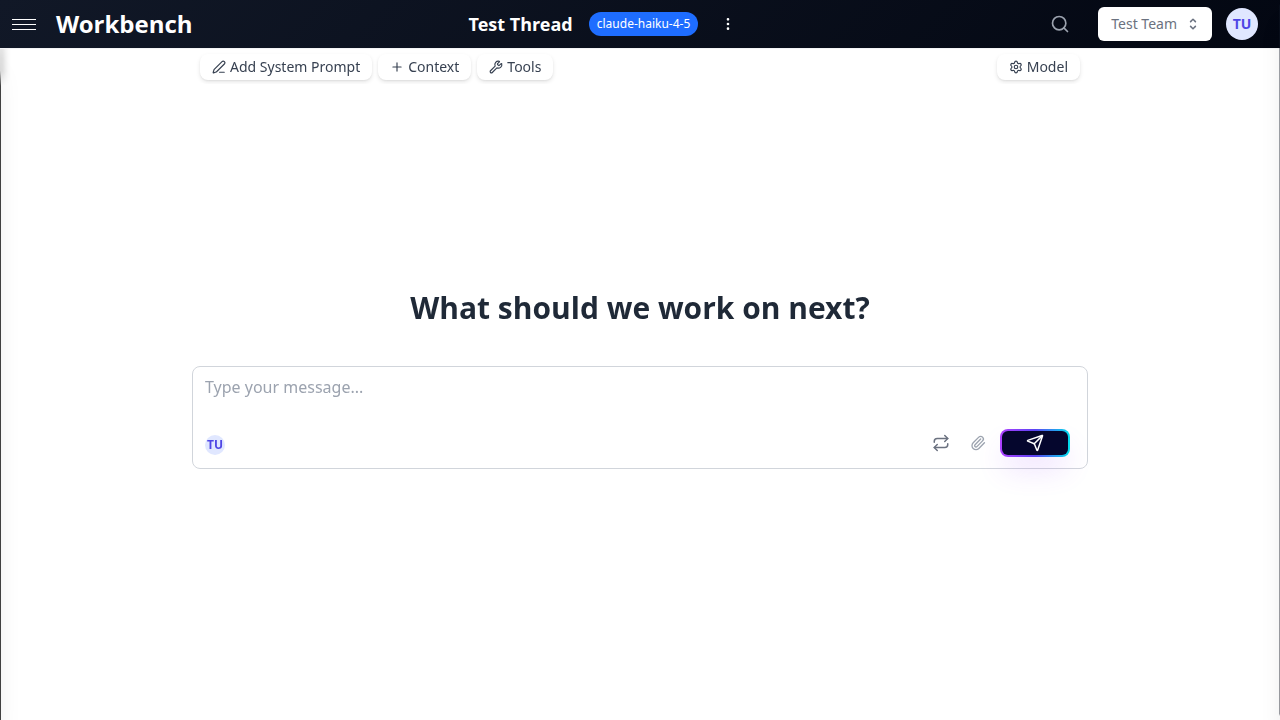
Unlike consumer AI chatbots that hide complexity behind simplified abstractions, GPT Workbench exposes the fundamental building blocks of LLM interactions -- system prompts, context, tools, and model parameters -- so that power users retain complete control over every aspect of their AI conversations. At the same time, sensible defaults and templates provide a streamlined experience for those who prefer to start quickly.
Our Philosophy
Transparency Over Magic
Every AI interaction in GPT Workbench is inspectable. You see exactly what the model receives: the system prompt that defines its behavior, the context blocks that provide reference data, the tools it can call, and the parameters that govern its output. This transparency is not a debug feature -- it is the product. When you understand what the AI sees, you can make it work better.
Full Context, Every Time
We believe in giving AI the complete picture. Rather than summarizing or compacting information to save costs, GPT Workbench prioritizes full context injection. When you attach a document or repository, the AI sees it all -- because better context means better results. Models with context windows of 1M tokens or more make this approach both practical and cost-effective.
Enterprise-Grade Integrations
Born from a data integration company, we bring deep expertise in connecting business systems. Our integrations with HubSpot, Microsoft 365, Google Workspace, SugarCRM, Document360, and 88+ tools are not afterthoughts -- they are built with the same rigor as enterprise middleware. Real productivity comes from AI that can access and act on your business data, not from AI that operates in isolation.
Tailored for Your Organization
We specialize in medium to large organizations that need more than one-size-fits-all solutions. Fine-grained controls let you configure:
- Model availability and limits per team
- Tool access and daily quotas per user
- Custom system prompts and templates at organization level
- Detailed usage analytics and cost tracking
- ROI calculation tools to measure AI impact (coming soon)
Simple, Transparent Pricing
No complex subscriptions or hidden fees. GPT Workbench uses straightforward usage-based pricing with a simple margin on top of provider costs. You pay for what you use, and you always know what that means.
Our real value comes from integration services. We have learned that the difference between AI that sits unused and AI that transforms operations is proper integration into your existing workflows, data sources, and business processes. That is where we focus our expertise -- helping you connect AI to what actually matters for your business.
What You Can Do
Multi-Provider AI
Access models from five providers through a single interface. Switch between providers mid-conversation without losing history. Each provider brings distinct strengths:
| Provider | Strengths |
|---|---|
| Anthropic (Claude) | Extended thinking, nuanced writing, code analysis |
| Google (Gemini) | Multimodal grounding, Search integration, large context |
| OpenAI (GPT) | Code interpreter, broad tool ecosystem |
| xAI (Grok) | Real-time web search, deep reasoning, 2M context |
| Mistral | Cost-efficient European provider, open-weights heritage |
Context Blocks for Business Data
Attach structured data to your conversations so the AI has persistent access to reference material. Context blocks support text, documents (PDF, DOCX, XLSX, CSV), Git repositories, URLs, HubSpot CRM records, SharePoint files, Google Drive documents, SugarCRM data, and Document360 articles. Context blocks are reusable across threads and shareable with teams.
88+ Integrated Tools
Extend AI capabilities beyond conversation with native tools (image generation, diagram creation, thread delegation), OAuth-powered integrations (HubSpot, Microsoft 365, Google Workspace), and MCP tools for research, development, and business workflows.
Team Collaboration
Create shared workspaces where team members access the same threads, context blocks, and tool configurations. Real-time presence indicators show who is viewing the same thread. Auto-context blocks ensure every team conversation starts with the right reference material.
Automation
Schedule recurring prompts to run on a cron schedule, trigger threads via API, or configure webhooks to respond to external events. Automate daily reports, weekly analyses, and monitoring workflows.
Architecture Overview
GPT Workbench is organized around four core concepts that work together.
Threads
A thread is a conversation with an AI model. Each thread has its own system prompt, model configuration, context blocks, and tools. Threads belong to a team (personal or shared) and track their own cost and token usage. You can run multiple threads simultaneously with different models.
Context Blocks
Context blocks are pieces of information you attach to threads to give the AI more context about your task. Unlike pasting data into every message, context blocks persist across the entire thread and are included automatically with each request. They sit between the system prompt and the conversation history in the prompt assembly.
| Type | Description |
|---|---|
| Text | Custom text snippets, guidelines, specifications |
| Documents | PDF, DOCX, XLSX, CSV, PPTX, images, code files |
| Repositories | Git repository code with branch and path filtering |
| URLs | Web page content, automatically scraped and refreshed |
| HubSpot | CRM contacts, companies, and deals |
| SharePoint | Microsoft 365 files and document libraries |
| Google Drive | Google Docs, Sheets, Slides, and uploaded files |
| SugarCRM | CRM module records |
| Document360 | Knowledge base articles and categories |
Tools
Tools extend the AI beyond text generation. When tools are enabled on a thread, the AI can call them during a conversation to perform actions: searching the web, generating images, creating diagrams, querying CRM data, reading emails, and more. Tools are configured per thread and can also be set at the team level.
Teams
Teams define how users collaborate, share resources, and manage access. Every user has a personal team (private workspace) and can belong to multiple shared teams. Shared teams provide a common thread list, shared context blocks, team-wide tool configurations, and role-based permissions (Owner, Admin, Member).
Navigating the Interface
Sidebar
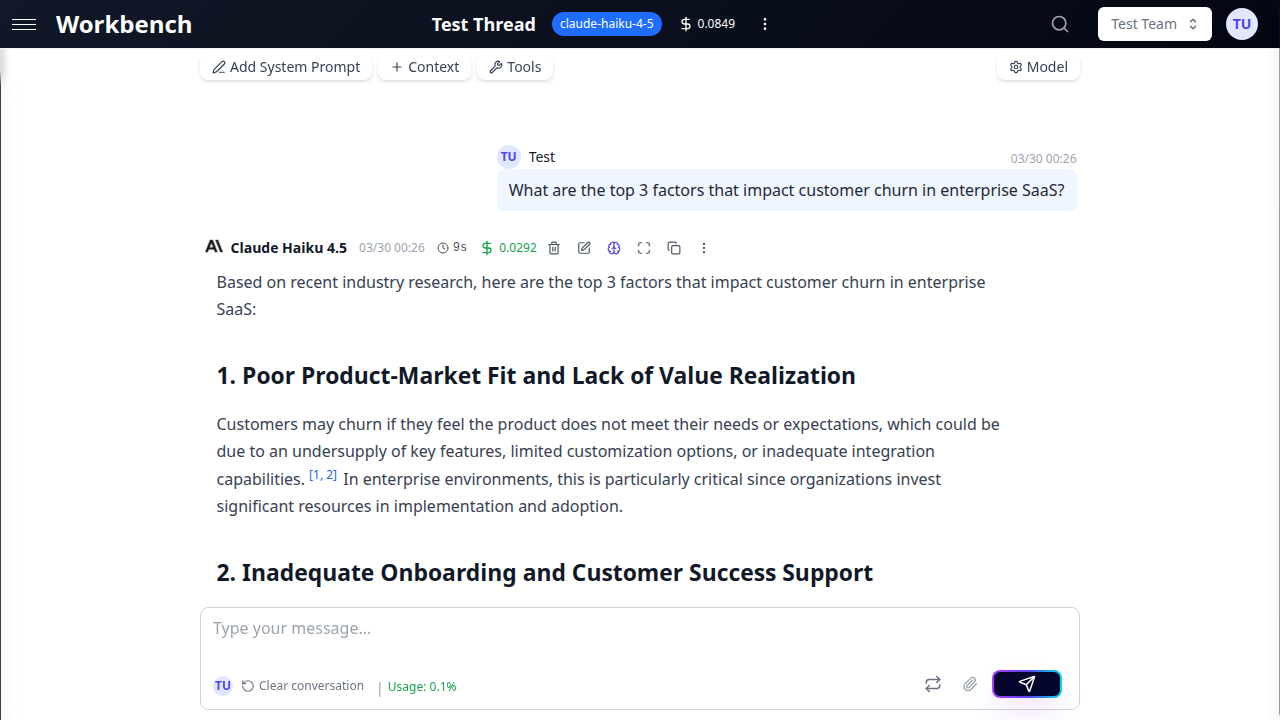
The sidebar on the left contains your thread list for the currently selected team. Use the New Thread button at the top to create a conversation. The search field filters threads by title. Threads are sorted by most recent activity.
Header
The header bar contains the team selector (switch between personal and shared teams), the global search (find threads across all teams), notifications, and your profile menu. The profile menu provides access to your user settings, organization panel (for admins), and logout.
Thread Area
The main content area displays the active thread. The toolbar at the top provides access to the system prompt editor, model selector, context manager, tool configuration, and conversation mode toggle. Below the toolbar, the message history scrolls vertically. At the bottom, the input area accepts your prompt with support for document attachments.
Conversation Modes
GPT Workbench offers two modes for managing conversation flow:
- Chat Mode -- Messages are automatically committed to the conversation history. This is the default mode and provides a familiar, fast-paced experience.
- Console Mode -- AI responses appear in a staging area. You review the response and click "Add to Conversation" to commit it. This mode is ideal for experimentation, iteration, and cost-conscious workflows.
Toggle between modes using the switch in the thread toolbar.
Supported Providers and Models
GPT Workbench connects to five AI providers. Models are grouped into three tiers based on capability and cost.
| Tier | Description | Example Models |
|---|---|---|
| Small | Fast and affordable. Best for drafting, summarization, and high-volume tasks. | Claude Haiku, Gemini Flash, GPT-5 Mini |
| Medium | Balanced performance and cost. Good for analysis, writing, and general-purpose work. | Claude Sonnet, Gemini Pro, GPT-5 |
| Large | Maximum capability. Use for complex reasoning, deep analysis, and challenging tasks. | Claude Opus, Grok 3, o3-pro |
Models can be switched at any point during a conversation. Different threads can use different models simultaneously. Your message history is preserved when switching models.
Requirements
GPT Workbench runs entirely in the browser. No desktop application or local installation is required.
Supported browsers:
- Chrome 90+ (recommended)
- Firefox 90+
- Safari 15+
- Edge 90+
Network requirements:
- Stable internet connection for real-time streaming
- Access to your organization's GPT Workbench instance
- Popup windows enabled for OAuth integration flows
Common Use Cases
GPT Workbench serves a wide range of professional workflows:
- Sales and account management -- Attach HubSpot CRM data to analyze pipelines, draft proposals, and assess deal risks with full context on contacts, companies, and deal history.
- Engineering and development -- Connect Git repositories for code review, architecture analysis, and documentation generation. Use tools for diagram creation and web research.
- Marketing and content -- Create brand-consistent content with organization-wide system prompts and auto-context blocks containing style guides and product specifications.
- Customer support -- Ground AI responses in your knowledge base (Document360, SharePoint) and CRM records to provide accurate, context-aware assistance.
- Data analysis and reporting -- Combine spreadsheet uploads, URL context, and CRM data for comprehensive analysis. Schedule recurring reports for automated delivery.
- Project management -- Integrate with Teamwork for task tracking, use thread templates for standardized workflows, and leverage team collaboration for shared AI workspaces.
Key Differentiators
| Feature | GPT Workbench | Consumer AI Chatbots |
|---|---|---|
| System prompt visibility | Fully editable and inspectable | Hidden or absent |
| Context management | Structured blocks with type-specific handling | Copy-paste into messages |
| Multi-provider support | 5 providers, 13+ models | Usually single provider |
| Business integrations | HubSpot, MS365, Google, SugarCRM, Document360 | Few or none |
| Team collaboration | Shared threads, presence, auto-context, roles | Individual accounts |
| Cost transparency | Per-run token and cost breakdown | Flat subscription |
| Tool ecosystem | 88+ tools (native, OAuth, MCP) | Limited built-in tools |
| Automation | Scheduled prompts, API triggers, webhooks | Manual only |
Next Steps
- Quick Start Guide -- Create your first thread in 5 minutes
- Working with Threads -- Learn about conversation modes, templates, and advanced features
- Context Blocks -- Attach business data to your conversations
- Models & Abilities -- Choose the right model and enable provider-native features
- Tools Overview -- Explore 88+ integrated tools
- Teams -- Set up collaboration across your organization
- Admin Panel -- Configure organization-wide settings and access controls
- User Settings -- Manage your profile, API tokens, integrations, and security