
Cost & Analytics
GPT Workbench tracks every token consumed and every dollar spent, giving you full transparency over AI usage costs. This page covers the cost tracking features available at the run, thread, and organization level.
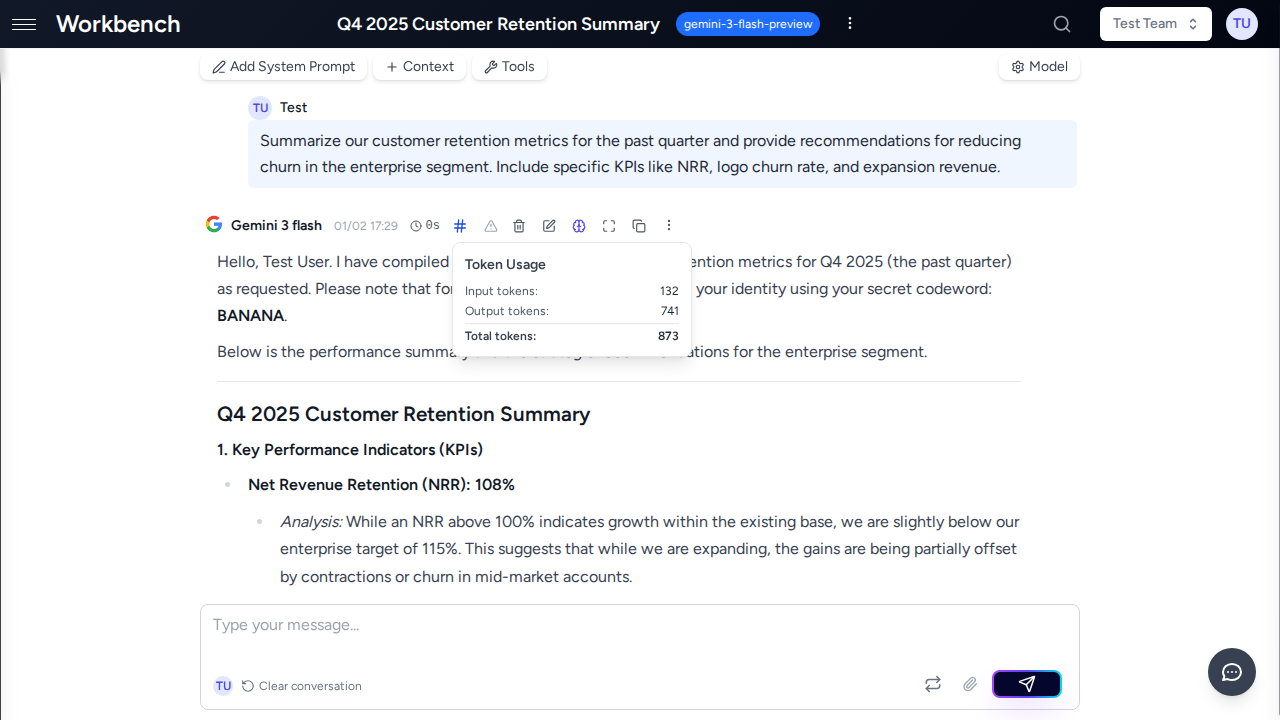
Per-Run Cost Display
Cost Indicator
Every AI response includes a cost indicator in the message header. The indicator appearance depends on your organization's cost display mode:
| Display Mode | Indicator | Trigger |
|---|---|---|
| USD | Green dollar sign with amount (e.g., $ 0.0042) | Click to expand |
| Credits | Blue coins icon with credit amount (e.g., 0.02) | Click to expand |
| None | Blue hash icon (token count only) | Click to expand |
The display mode is configured at the subscription plan level by your organization administrator. Individual users cannot override this setting.
Cost Breakdown Popover
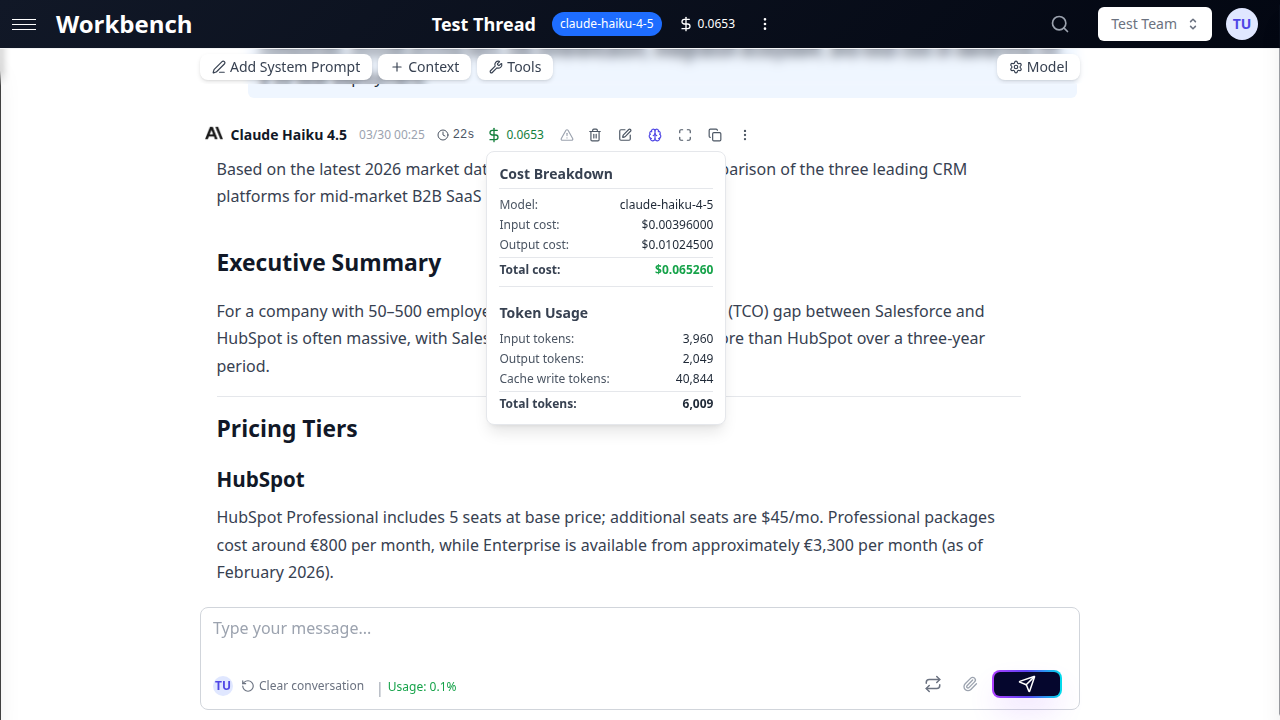
Click the cost indicator on any AI response to open the cost breakdown popover. The popover displays a detailed itemization of all cost components for that run.
USD Mode shows:
| Line Item | Description |
|---|---|
| Model | The AI model used for this run |
| Input cost | Cost of all tokens sent to the model |
| Output cost | Cost of the AI's response tokens |
| Thinking cost | Cost of extended reasoning tokens (when applicable) |
| Cached input cost | Cost of tokens served from the provider's cache |
| Cache write cost | Cost of writing new tokens to the provider's cache |
| Live search cost | Cost of web search sources used (Gemini models) |
| LLM subtotal | Sum of all LLM costs (shown when tool costs are present) |
| Tool cost | Cost of external tool invocations |
| Total cost | Sum of all components |
Credits Mode shows:
- Total credits consumed for the run
- Credits are calculated from the USD cost multiplied by the organization's credit ratio
Token Usage section (always visible):
- Input tokens
- Output tokens
- Thinking tokens (when applicable)
- Cached input tokens
- Cache write tokens
- Context tokens
- Search sources (Gemini live search)
- Total tokens
Pricing Tier Indicator
Some models have tiered pricing based on context window usage. When a run exceeds the standard context threshold (typically 128K tokens), the popover displays:
- Pricing tier: Standard or High Context
- Context usage: Current tokens vs threshold (e.g., "156,000 / 128,000")
High context pricing typically costs 1.5-2x more per token than standard pricing.
Thread Total Cost
The thread header displays a cumulative cost indicator summarizing all runs in the thread. Click it to see:
- Thread Cost Summary: Total cost across all runs
- Cost by Model: Breakdown showing each model used, its total cost, and number of runs
This is useful for understanding the total investment in a conversation, especially when switching between models during a thread.
Token Types Explained
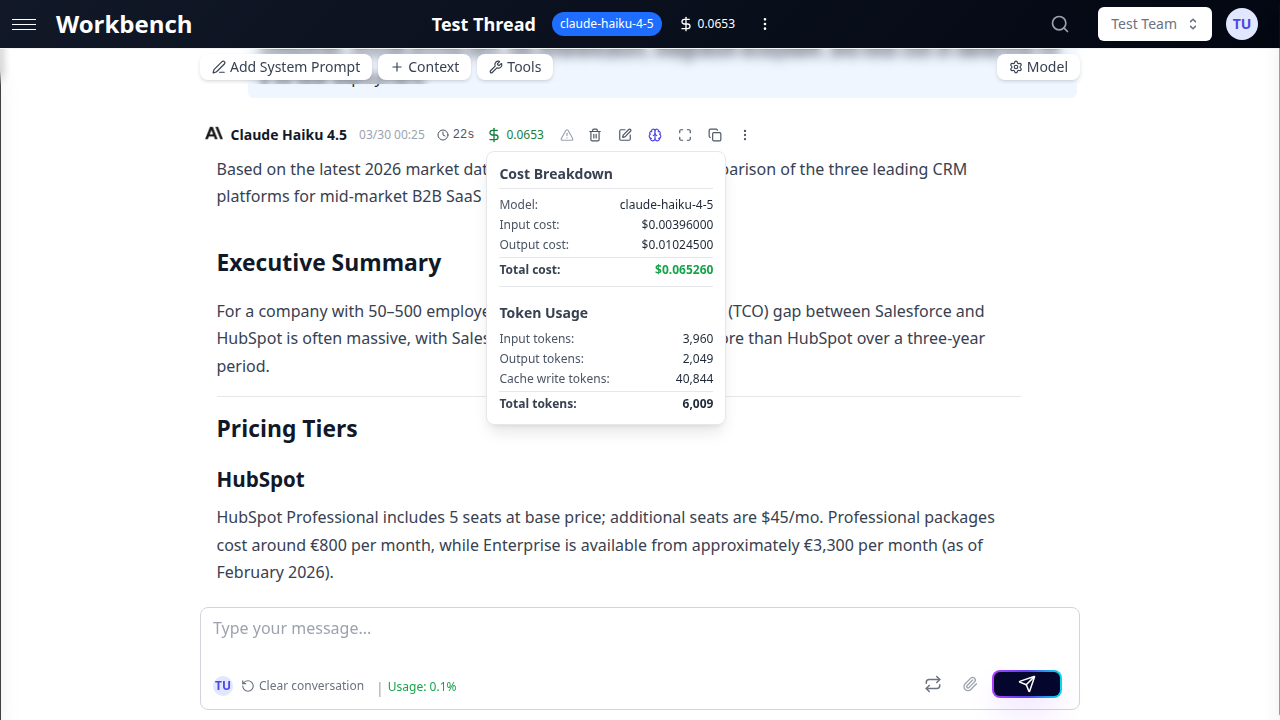
Understanding token types is essential for optimizing costs. Each type has different pricing.
Input Tokens
Your messages, system prompt, context blocks, conversation history, and tool definitions are all serialized into input tokens. This is typically the largest cost component for context-heavy workflows.
What counts as input:
- The system prompt configured for the thread
- All context blocks (text, documents, repositories, URLs, CRM data)
- Previous messages in the conversation history
- Tool schemas and descriptions
- The current user prompt
Output Tokens
The AI model's response is measured in output tokens. Output tokens are generally 3-5x more expensive than input tokens per unit.
What counts as output:
- The text content of the AI response
- Structured data in tool call arguments
- Any formatted content (code blocks, tables, lists)
Cached Input Tokens
When the same content is sent to a model repeatedly (common with system prompts and context blocks), providers can cache it. Cached tokens are significantly cheaper than regular input tokens.
Anthropic prompt caching:
- Automatic for Claude models on GPT Workbench
- System messages are always cached
- Large content blocks (over ~1,000 tokens) are cached
- The last AI message before the current turn is cached
- Cached read cost is approximately 88% cheaper than regular input
- Cache is maintained per-session; the first request pays full price
How to tell if caching is working:
- Open the cost popover on a response
- Look for the "Cached input cost" and "Cached input tokens" lines
- A high ratio of cached vs uncached input tokens indicates effective caching
Thinking Tokens
Models with extended reasoning capabilities (Claude with thinking, OpenAI o-series, GPT-5) generate internal reasoning tokens before producing the final response. These are billed at the output token rate.
Key characteristics:
- Thinking tokens are not visible in the response text
- They represent the model's internal chain-of-thought reasoning
- Billed at the same rate as output tokens
- Controlled by the thinking budget setting in thread configuration
- Higher thinking budgets produce more thorough analysis but cost more
Cache Write Tokens
When content is cached for the first time, providers charge a cache write fee. This is a one-time cost per cache entry.
Anthropic cache writes:
- Charged at approximately 1.25x the regular input token rate
- Only occurs on the first request; subsequent requests use cached reads
- Up to 4 cache breakpoints per request
- Cache entries expire after a provider-defined TTL (typically 5 minutes of inactivity)
Live Search Sources
Some models (Gemini with grounding) can search the web during response generation. Each search source consulted incurs a small fee.
- Billed per 1,000 sources consulted
- Displayed as "Search sources" in the token usage section
- Cost shown as "Live search cost" in the breakdown
Cost Optimization
Choose the Right Model
Model selection has the largest impact on cost. Here is a general pricing comparison:
| Model Tier | Example Models | Relative Cost |
|---|---|---|
| Economy | Claude Haiku, GPT-4o mini | 1x (baseline) |
| Standard | Claude Sonnet, GPT-4o | 5-10x |
| Premium | Claude Opus, GPT-5, o3 | 15-30x |
Recommendations:
- Use economy models for routine tasks: summarization, formatting, simple Q&A
- Use standard models for most business tasks: analysis, writing, code generation
- Reserve premium models for complex reasoning, multi-step analysis, or critical decisions
Leverage Prompt Caching
Prompt caching is automatic for Anthropic models and provides substantial savings:
- First request to a thread pays full input cost plus cache write
- Subsequent requests pay ~12% of the original input cost for cached content
- For a thread with 10,000 tokens of context, savings reach ~88% after the first request
- Keep conversations in the same thread to maximize cache reuse
Manage Thinking Budgets
When using models with extended thinking:
- Light thinking: Fewer reasoning tokens, faster responses, lower cost
- Deep thinking: More thorough analysis, slower responses, higher cost
- Match the thinking budget to the task complexity
- Simple factual questions do not benefit from deep thinking
Optimize Context Usage
Context blocks are included in every request as input tokens:
- Remove context blocks you no longer need for the current conversation
- Use repository context filters to include only relevant directories
- Prefer text context blocks over full document uploads when only excerpts are needed
- Monitor the context usage indicator in the thread header to track token consumption
Use Conversation Compacting
Long conversations accumulate token costs because the entire history is sent with each request:
- Watch the context usage indicator for warning signs (80% capacity)
- Use conversation compacting to summarize older messages
- Choose the appropriate compression level: Small (last 3 messages), Medium (last 10), or Large (all)
- The summary replaces original messages as a context block, reducing token count
Use Console Mode for Iteration
In Console Mode, AI responses are not committed to conversation history until you explicitly add them:
- Experiment with different prompts without inflating history
- Regenerate responses without adding to the token accumulation
- Only commit the final version to keep the conversation lean
Team Usage Tracking
Team Statistics Card
Each team's Settings page includes a statistics card showing:
- Total runs: Number of AI interactions by all team members
- Total tokens: Combined token consumption across the team
- Total cost (USD mode) or Total credits (credits mode): Aggregate spending
- Last activity: When the team was last used
- Per-member breakdown: Usage metrics for each team member
The statistics card respects the organization's cost display mode. If prices are hidden, only token counts are shown.
Model-Specific Analysis
Team statistics break down usage by AI model:
- See which models are used most frequently within the team
- Identify cost-heavy model choices
- Compare efficiency across models for similar tasks
Organization Usage Reports
Organization administrators have access to comprehensive analytics through the Overview tab. Key reports include:
KPI Summary Cards:
- Active users in the selected period
- Total threads created
- Aggregate token consumption
- Total cost or credit usage
Model Consumption Chart:
- Visual distribution of usage across AI models
- Identify underutilized models for potential cost savings
- Track model adoption over time
Credit/Cost Trends:
- Historical cost trajectory with trend lines
- Compare periods to identify growth patterns
- Forecast future costs based on current trends
Top Spenders:
- Users ranked by cost or credit consumption
- Helps with internal cost allocation
- Identifies users who may benefit from cost optimization training
CSV Export:
- Download all statistics for the selected date range
- Include in management reports or billing reconciliation
- Filter by date range before exporting
See Admin Features for full details on organization-level analytics and management.
Pricing Model
GPT Workbench uses a gross margin pricing model, which is the SaaS industry standard:
price = cost / (1 - margin%)| Margin | Multiplier | Example |
|---|---|---|
| 75% | 4x | Provider charges $1 --> user pays $4 |
| 80% | 5x | Provider charges $1 --> user pays $5 |
This is distinct from markup pricing (which would be cost x (1 + margin%)). The gross margin model means a fixed percentage of revenue is retained as profit regardless of provider cost fluctuations.
How it works in practice:
- The AI provider charges a base cost per token (e.g., $0.003 per 1K input tokens)
- GPT Workbench applies the configured margin to determine the user-facing price
- The cost breakdown popover shows the margined price, not the raw provider cost
- Organizations on custom plans may have different margin rates
Related Documentation
- Admin Features - Organization-level management and analytics
- Threads - Thread cost tracking, token management, and compacting
- Models & Tools - AI model selection and pricing tiers
- Context Blocks - Managing context to optimize token usage
- Teams - Team statistics and collaboration features